Nano Banana 2.1
Google's latest fast image generation model — the high-efficiency counterpart to Nano Banana Pro. Builds on Nano Banana 2 with sharper output, better text rendering, and real-time grounding while keeping Flash-family speed and cost. Features conversational editing, multi-image fusion with up to 14 reference images, Google Web / Image Search grounding, and resolutions up to 4K.
Run it right now
Test this model instantly in the Console Playground — no code required
Use with AI Assistant
Copy usage instructions for Claude, ChatGPT, or other AI
Quick Start
curl -X POST "https://api.core.today/v1/predictions" \
  -H "Content-Type: application/json" \
  -H "X-API-Key: cdt_your_api_key" \
  -d '{
  "model": "google/nano-banana-2.1",
  "input": {
    "prompt": "A vibrant storefront window display for a bakery called \"CORE.TODAY\", with the name spelled out in elegant hand-painted gold lettering on the glass, fresh pastries and banana bread artfully arranged inside, warm morning light, photorealistic, highly detailed",
    "aspect_ratio": "16:9",
    "resolution": "1K",
    "output_format": "jpg"
  }
}'Parameters
| Parameter | Type | Required | Default | Description |
|---|---|---|---|---|
prompt | string | Yes | - | A text description of the image you want to generate |
image_input | array | No | [] | Input images to transform or use as reference (supports up to 14 images) |
aspect_ratio | string | No | match_input_image | Aspect ratio of the generated image match_input_image1:11:41:82:33:23:44:14:34:55:48:19:1616:921:9 |
resolution | string | No | 1K | Resolution of the generated image. Higher resolutions take longer to generate. 1K2K4K |
google_search | boolean | No | false | Use Google Web Search grounding for real-time information (weather, sports scores, recent events) |
image_search | boolean | No | false | Use Google Image Search grounding for visual context. Enabling this also enables web search. |
output_format | string | No | jpg | Format of the output image jpgpng |
How to Provide File Input
There are 3 ways to provide files for the image_input parameter:
Image URL
Pass a publicly accessible URL directly. With the Storage API (POST /v1/files/upload-url) the file uploads straight to S3 (50MB per file) and you pass the returned file_url.
{
  "model": "google/nano-banana-2.1",
  "input": {
    "prompt": "your prompt here",
    "image_input": ["https://example.com/image.jpg"]
  }
}Direct Upload (Multipart)
Attach files directly to POST /v1/predictions/upload. No separate upload step, but the bytes pass through the API server so the whole request is capped at 10MB.
curl -X POST "https://api.core.today/v1/predictions/upload" \
  -H "X-API-Key: cdt_your_api_key" \
  -F "model=google/nano-banana-2.1" \
  -F 'input={"prompt":"your prompt here"}' \
-F "file:image_input=@your_file.png"Common Parameters
Common parameters used when calling POST /v1/predictions.
| Parameter | Type | Required | Default | Description |
|---|---|---|---|---|
model | string | Yes | - | Model identifier |
input | object | Yes | - | Object containing the model-specific parameters from the table above |
output_folder | string | No | - | Folder path for output files (max 256 chars, '..' not allowed) |
webhook_url | string | No | - | Webhook URL to call on completion |
is_public | boolean | No | false | If true, output files are also available via permanent public URLs |
Examples
Text Rendering in a Scene
Render a brand name as hand-painted lettering on a storefront window
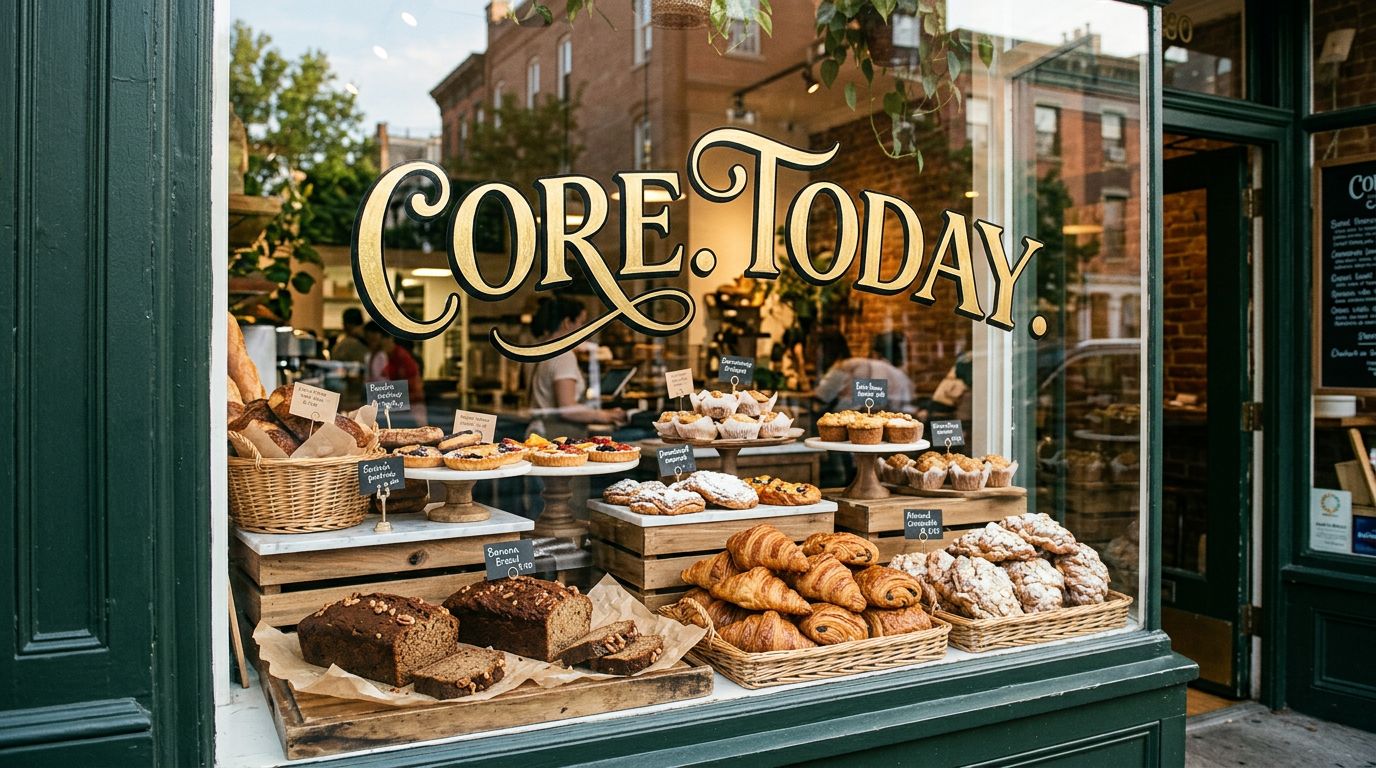
curl -X POST "https://api.core.today/v1/predictions" \
  -H "Content-Type: application/json" \
  -H "X-API-Key: cdt_your_api_key" \
  -d '{
  "model": "google/nano-banana-2.1",
  "input": {
    "prompt": "A vibrant storefront window display for a bakery called \"CORE.TODAY\", with the name spelled out in elegant hand-painted gold lettering on the glass, fresh pastries and banana bread artfully arranged inside, warm morning light, photorealistic, highly detailed",
    "aspect_ratio": "16:9",
    "resolution": "1K",
    "output_format": "jpg"
  }
}'Photorealistic Close-up
Generate a playful photorealistic image with golden hour lighting
curl -X POST "https://api.core.today/v1/predictions" \
  -H "Content-Type: application/json" \
  -H "X-API-Key: cdt_your_api_key" \
  -d '{
  "model": "google/nano-banana-2.1",
  "input": {
    "prompt": "a photorealistic close-up of a ripe banana wearing tiny sunglasses on a beach, golden hour lighting",
    "aspect_ratio": "16:9",
    "resolution": "1K"
  }
}'Tips & Best Practices
Use Cases
Model Info
API Endpoint
POST /v1/predictions